General
The Best Note-Taking Apps With a Whiteboard and Spreadsheets
Most ideas don't arrive as neat paragraphs. They show up as a rough sketch, a few numbers that need adding up, and some notes to explain both. Yet most apps make you pick one: a notes app, a spreadsheet, or a whiteboard. This guide looks a…
Most ideas don't arrive as neat paragraphs. They show up as a rough sketch, a few numbers that need adding up, and some notes to explain both. Yet most apps make you pick one: a notes app, a spreadsheet, or a whiteboard.
This guide looks at note-taking apps that also give you a whiteboard and spreadsheets, so the sketch, the numbers and the notes can live together. We compared five popular options in October 2026.
Full disclosure: we make Yazora, one of the apps below. We have tried to be fair, including where another app is the better fit.
What to look for
Before comparing apps, it helps to agree on what "notes, whiteboard and spreadsheets in one place" should mean:
- A real canvas. Freehand drawing, shapes and arrows, not just a page you can drop images on.
- Real spreadsheets. Cells and formulas, not only a formatted table inside a note.
- One library. Notes, boards and sheets in the same folders, tags and search, so nothing gets lost.
- Works offline. Ideas don't wait for Wi-Fi.
At a glance
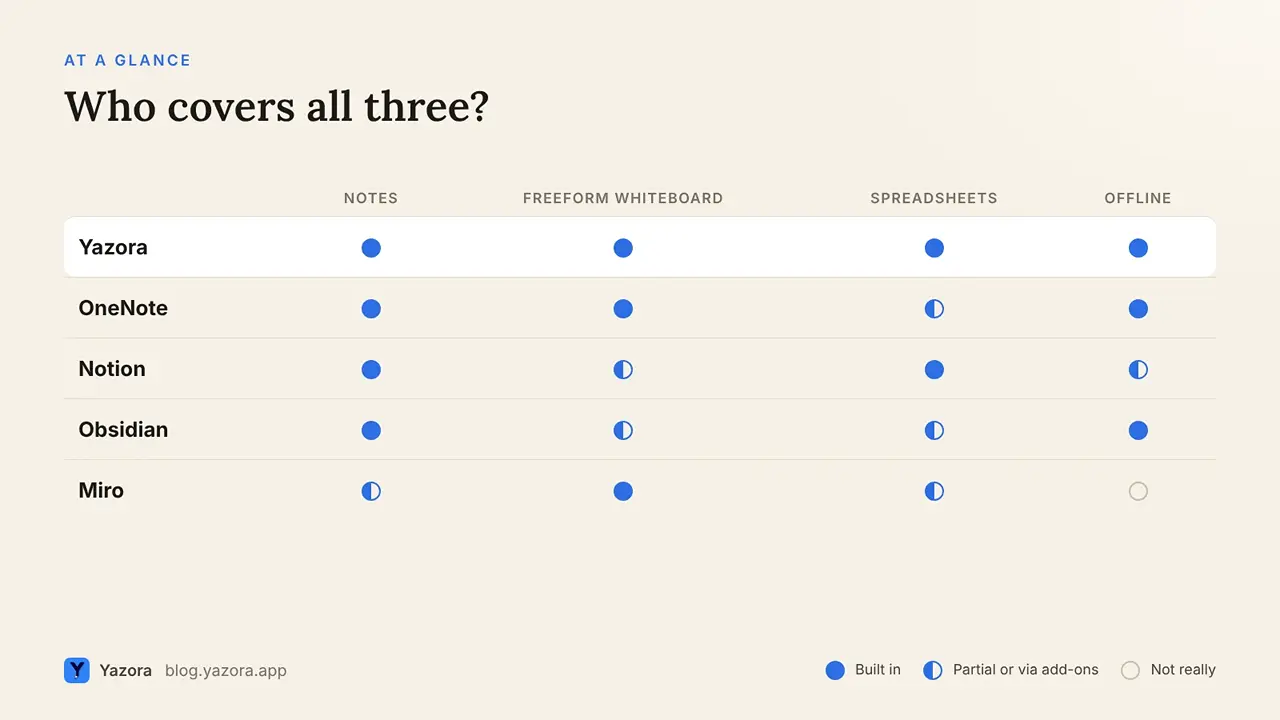
App | Notes | Freeform whiteboard | Spreadsheets | Offline |
Yazora | Yes | Built-in drawing boards | Built-in, with formulas | By default |
Microsoft OneNote | Yes | Ink and shapes on the page | Basic tables; embed Excel files | Yes |
Notion | Yes | Through embeds | Databases and tables | If you prepare pages |
Obsidian | Yes | Canvas for cards and links | Through plugins | Yes |
Miro | Light docs on the board | Yes, it's the core | Tables on the board | Online-first |
1. Yazora: all three as first-class types
In Yazora, a Document, a Spreadsheet and a Drawing Board are separate document types that share the same folders, tags, favorites and search.
- Drawing boards have shapes, arrows, lines, freehand drawing, text and images on a free canvas.
- Spreadsheets have formulas and data tools, and import Excel, CSV and OpenDocument files.
- Documents support headings, tasks, tables, code blocks, files, links between documents and backlinks.
- Offline by default: every change is saved to your device first and syncs later.
- Teams: edit documents, spreadsheets and drawing boards together in real time on paid Team plans.
Price: Personal Free includes all three document types and 250 MB of storage. Yazora Pro is $4.99/month; Team Pro is $29.99/month for up to 10 people.
Consider something else if you need an infinite, sticky-note style workshop board for large live sessions, where Miro is built for exactly that.
2. Microsoft OneNote: best for handwriting and ink
OneNote is free and has been a favorite for handwritten notes for years. You can write and draw anywhere on a page with pens, highlighters and shapes, and on Windows convert handwriting to text, as How-To Geek's drawing guide shows.
- Spreadsheets: simple tables in the page; for real calculations you embed an Excel file.
- Trade-off: drawing tools are richer on Windows than on Mac, and pages can feel loosely structured as a library grows.
Best for students and anyone who writes with a stylus.
3. Notion: strong tables, no native whiteboard
Notion's databases are excellent for structured data, with views, filters and formula properties. For freeform drawing, though, Notion relies on embeds and third-party tools such as GoDraw.
- Offline: you mark pages Available offline on each device, and databases download their first 50 rows automatically, per Notion's offline guide.
Best for teams that think in databases more than in sketches. See our Yazora vs Notion guide for a full comparison.
4. Obsidian: Canvas for visual thinking
Obsidian's Canvas is a core plugin that lets you lay out text cards, notes, images and PDFs, connect them with labeled arrows and group them. It's great for mapping ideas. Freehand drawing and spreadsheets come through community plugins rather than built-in features.
Best for people who want local Markdown files and enjoy customizing their setup.
5. Miro: the whiteboard first
Miro is a collaborative whiteboard at heart, built for workshops, brainstorming and diagrams with many people at once. Notes and tables live on the board rather than in a notes library. The free plan includes 3 editable boards, according to Costbench's plan summary.
Best for live team workshops. Pair it with a notes app if you need a long-term knowledge base.
How to choose
- You write and sketch by hand: OneNote.
- Your work is mostly structured data: Notion.
- You love local files and plugins: Obsidian with Canvas.
- You run big live workshops: Miro.
- You want notes, sketches and spreadsheets side by side, online or offline, alone or with a team: Yazora.
FAQ
Is there a notes app with a built-in whiteboard? Yes. Yazora includes drawing boards as a document type, OneNote lets you draw directly on pages, and Obsidian's Canvas lets you arrange notes visually.
Can I use spreadsheets inside a notes app? Yazora has built-in spreadsheets with formulas. OneNote can embed Excel files, Notion has databases with formula properties, and Obsidian supports spreadsheets through plugins.
Which of these apps work offline? Yazora, OneNote and Obsidian work offline by default. Notion works offline for pages you prepare in advance. Miro is designed to be used online.
Is Yazora free? Yes. Personal Free includes documents, spreadsheets and drawing boards, 250 MB of storage and up to 2 sync devices, with no time limit.
Keep your sketches, numbers and notes together. Start with Yazora for free.